Orca is the chief of staff for people who run things.
Every meeting booked, prepped and followed up. Nothing sent without your yes.
Someone emails "shall we chat next week?" and Orca offers times and books it, briefs you before, takes the notes and drafts the follow-up in your voice the moment the call ends. You read it, change it if you want, and press send. It's a desktop app for Mac and Windows that works on your own Outlook or Gmail and calendar.
£149 a month. Claude usage included, no setup fee, cancel any time. Full pricing. The inbox check is free, with nothing to install.
How Orca handles one meeting, start to finish:
- An email lands from Dave Harrington at Meridian Partners: shall we chat next week?
- Orca drafts a reply offering two times from your real diary. You say yes, and it is sent.
- Dave picks Tuesday at 11:00 and the meeting goes into your calendar.
- Thirty minutes before, your brief appears: who he is, where you met last time, and what you promised.
- On the call, Orca Meet joins and takes the notes.
- When the call ends, the follow-up is drafted in your voice. You say yes, and it is sent.
- The actions agreed on the call become tasks, each with an owner and a date.
- Later you ask Orca what you promised Dave, and it answers from the call.
Orca in thirty seconds
“Say you email me about meeting next Wednesday. Orca offers you a couple of times and books the one you pick, and if we need to move it, it moves it. Before we meet I get a brief on you, what we said last time, what I promised. It takes the notes on the call. By the time I’ve hung up the follow-up’s written, in my words, waiting for my yes. Nothing goes without that yes. That follow-up used to go four days late. Now it goes the same afternoon.”

Claude and ChatGPT
Already connected Claude or ChatGPT to your email?
Good. They’re brilliant, and they’re getting better at email all the time. Orca runs on Claude too. The difference is the job: they’re general assistants you drive, and Orca is a chief of staff built around your meetings and the people in them. Plenty of desks have room for both.
| What you get | Claude or ChatGPT on its own | Orca |
|---|---|---|
| A notetaker on the call | No bot of their own. ChatGPT records your own Mac’s audio; Claude uses third-party connectors. | Joins Teams, Zoom and Google Meet from the cloud, under a name you choose. |
| A record of each person | Good general memory. No per-person record documented. | Who owes whom a reply, promises both ways, facts with their sources. |
| The meeting loop | Self-serve pieces: mail, calendar and scheduled tasks you set up yourself. | Booked, briefed 30 minutes before, noted and followed up, set up around you on a database of your own. |
| Sending | Asks first by default, with settings that let some actions run without asking. | Every email waits for your yes. No “allow all” switch; the one exception is out-of-office replies, which you turn on. |
| Microsoft 365, in the UK | As of October 2026, their newest always-on agents are US-only, not on UK Pro plans, or not on Microsoft 365 yet. | Drafts replies to new mail on Microsoft 365 and Google, for UK users, today. |
The full comparison, with sources and when you only need one
How it works
One loop, round every meeting.
The support people at your level have always had: always prepared, the follow-up gone the same afternoon, and your judgement on every word that leaves.
-
1
Book
Orca offers times from your real diary, books the one they pick, and moves it if plans change.
-
2
Prep
A brief before each meeting: who they are, what you said last time, what you promised.
-
3
Notes
The notetaker joins the call and takes the notes, so you can give the room your full attention.
-
4
Follow-up
By the time you hang up, the follow-up is written in your words, with the actions you agreed.
-
5
Your yes
You read it, change it if you want, and press send. Nothing goes without that yes.
With Orca
What it looks like on the day.
Open the interactive walkthrough (opens in a new tab)
Your data
Where your data lives, in plain words.
- A database of your own. Hosted by us in London and walled off from every other customer.
- Read for you, never about you. Never used to train AI models, never sold, never shared.
- Yours to take. Export everything whenever you like. When you leave, we delete it.
- Sign in with Microsoft or Google. No passwords stored.
- Nothing sent without your approval
- DPIA completed (ICO guidance)
- DPA provided before onboarding
- ICO registered
What’s inside
The actual product, mid‑morning.
One list of what needs you, a briefing ready before you sit down, and everything Orca prepared while you were in meetings.
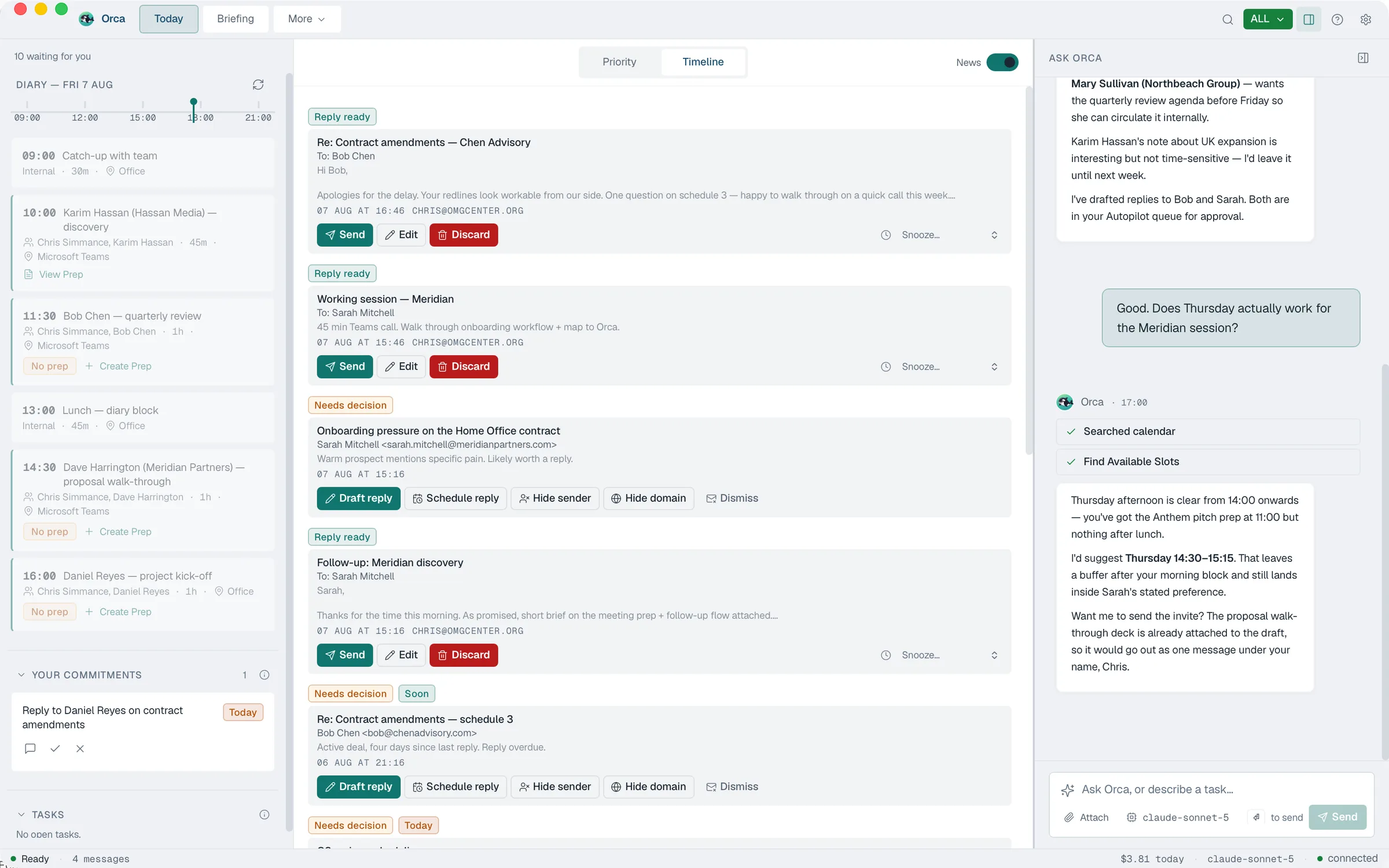
The parts that run the loop.
Eighteen apps sit behind the loop. These are the ones you will meet first. Tap any to see it working.
Everything inside Orca
Works with Microsoft 365 or Google Workspace, Microsoft Teams, LinkedIn, ClickUp or Trello, WhatsApp or Pushover, Companies House and Chrome, and imports from Fireflies, Fathom or Otter if you use them. Claude usage is included, and we supply its key with your licence.
What the people running it say.
Everything Orca does on my behalf goes through me first. That approval step is what makes it usable in a real business.
Orca really is a game changer. My new personal assistant has turned hours of admin into minutes. Not only giving me the time back but really enriching the information I then have to hand.
It neatly mitigates the resource drain of a host of small tasks and allows them to be effectively managed in one space, at a fraction of the time previously spent.
What impresses us most about Orca is that they never stand still. They are constantly looking for ways to innovate, enhance their platform, and provide even greater value to their clients. I would have absolutely no hesitation in recommending them.


Highly Commended
Stationers' Innovation Excellence Awards 2026. Entered by OMG Center Ltd.
The support people at your level have.
Orca, £149 a month. Claude usage included, no setup fee, cancel any time. Running a team? Orca for Teams is £250 a seat, with your team’s own database and hands-on onboarding. See both.
Your licence arrives by email within about 20 minutes.